
Understanding Detached Parts in ClickHouse®
If you’ve ever worked with ClickHouse, you’ve probably encountered its unique way of handling data. One of the more intriguing concepts in ClickHouse is detached parts. While they might sound like a minor technical detail, understanding detached parts is essential. ClickHouse is designed to fully utilize available system resources. However, when the system becomes overloaded and resources such as memory, CPU, and I/O are maxed out, there is a high risk of out-of-memory (OOM) errors or unresponsive pods being restarted by the kubelet due to failed liveness probes. These abrupt or unexpected restarts can result in the appearance of detached parts.
In this blog post, we’ll break down what detached parts are, why they exist, and how to manage them effectively.
What Are Detached Parts?
Let’s first go to the basics. In ClickHouse, data is stored in parts. Each part is an immutable chunk of data, organized in a columnar format. These parts are the building blocks of ClickHouse tables, and they allow the database to achieve its famous performance for analytical queries.
ClickHouse merges consolidate multiple smaller data parts within a table into fewer, larger parts to improve query performance and reduce storage overhead. When data is inserted into a MergeTree table, it’s initially written as small, immutable parts. Over time, the system automatically merges these parts based on certain rules and heuristics (like size and age) to keep the number of parts manageable and maintain optimal read efficiency. While merges improve performance in the long run, they consume CPU, disk I/O, and memory, so their behavior can be fine-tuned or throttled for low-resource environments.
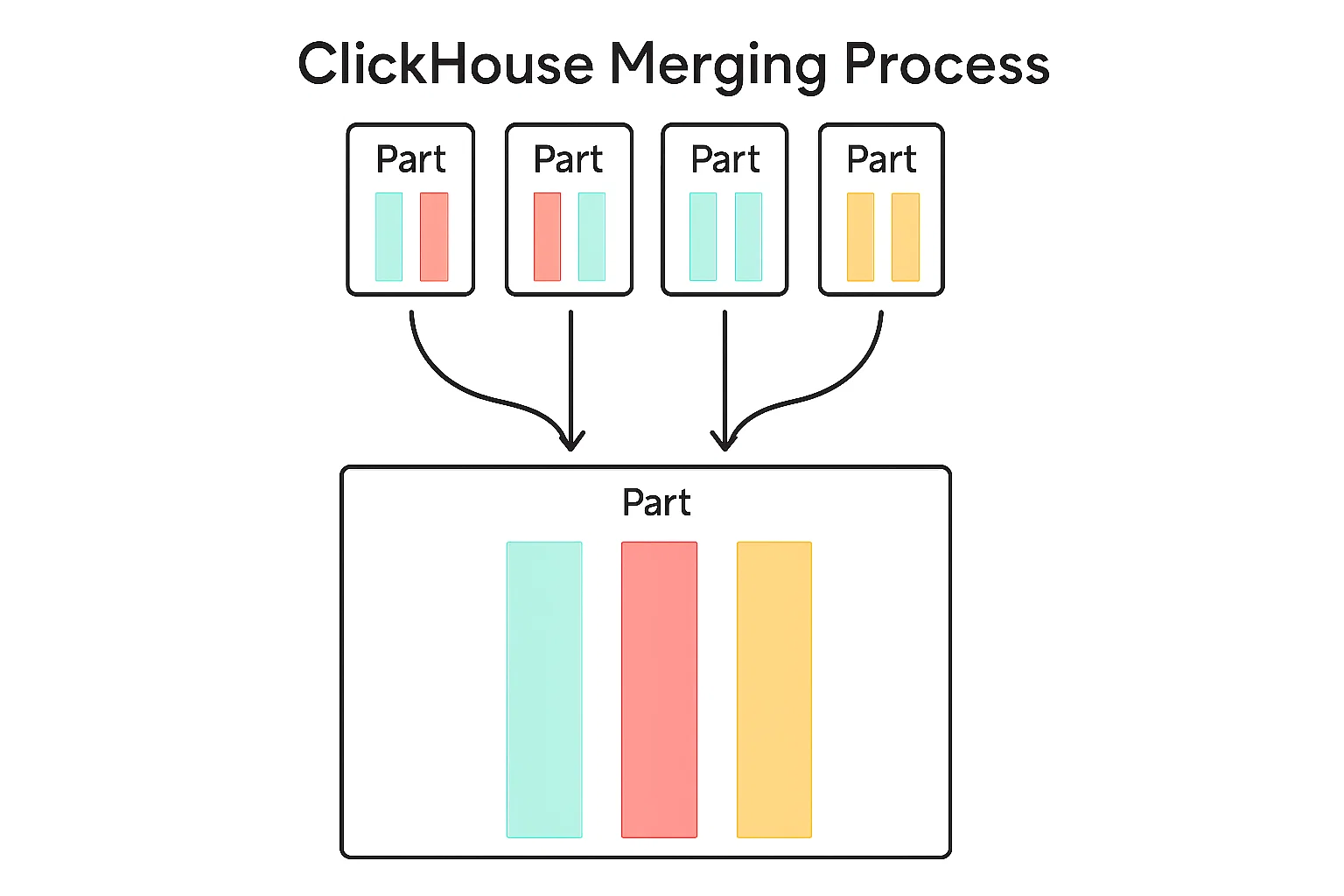
Figure 1: Merging smaller parts into a bigger one
But what happens when data changes? Since, ClickHouse doesn’t modify existing parts directly, (they are immutable, remember?), merges also handle data cleanup for deleted or updated rows. These type of merges are called mutations. If a part needs to be mutated, ClickHouse will create a new part with the changes, mark the old one as inactive and the new one as active, so the cleaning background process can delete those and reclaim space.
Inactive parts are essentially data segments that are no longer part of the active dataset but still exist on disk. They’re like old snapshots of your data, waiting to be cleaned up.
Ok, so what is the difference between inactive parts and detached parts? Think of detached parts as data chunks that are still physically present on your disk but are intentionally excluded from the table’s active data set. They can be explicitly detached by a ClickHouse command or can be automatically detached by Clickhouse, which is the most common case.
In contrast to detached parts, inactive parts are not explicitly put aside by an administrator. Instead, they represent an internal, transient state of data parts that are no longer considered the “current” version and are slated for eventual removal.
In the next image you can see the building blocks of a part and how it is named. The naming is important, and I will explain it in a later section.

Figure 2: The basic building blocks of a part
Why Do I Get Detached Parts?
Detached parts are a byproduct of ClickHouse’s design philosophy, which prioritizes immutability and performance. Here are some common scenarios where detached parts come into play:
1. Failed Inserts/Merges/Mutations
ClickHouse doesn’t modify the existing data. Instead, it creates new parts with the updated data and after mutation is finished, simply marks the old ones as inactive. This ensures that queries can continue running without interruption while the merge/mutation is in progress.
If a data ingestion or merge/mutation operation fails because of:
- Unexpected/hard restart
- A bug in ClickHouse leading to damage of mutated / merged data
- Misconfiguration of macros / volumes or similar user mistakes
- Partial merge due to lack of fsyncs
ClickHouse might leave behind detached parts as a safety measure. This prevents data corruption and allows you to recover from the failure if possible.
For example, a merge/mutation failed because of a hard restart and we have the source parts, which were merged, but the merge was half-flushed at the moment of the hard restart. ClickHouse will detach the source parts as ‘covered’, and the new part which has some columns unreadable will produce some errors during queries. So what can we do? We can recover from old covered parts in the detached directory and drop the corrupted half-merged part. We will talk about this in the section Reattaching detached parts.
2. Manual Detachment
You can manually detach parts using the ALTER TABLE ... DETACH PART command. This is useful for troubleshooting or temporarily removing data without deleting it permanently. This procedure will help in the above example. We would detach the corrupted part and attach the older parts.
3. Replication and Merges
In replicated tables, detached parts can occur during merge operations or when there are inconsistencies between replicas. ClickHouse detaches parts to ensure data consistency across the cluster.
Where Are Detached Parts Stored?
Detached parts live in a special subdirectory called detached within the table’s data directory. For example, if your table is located at:
/var/lib/clickhouse/data/database_name/table_name/
You’ll find the detached parts in:
/var/lib/clickhouse/data/database_name/table_name/detached/
Each detached part is stored in its own directory, named after the part’s identifier. This makes it easy to identify and manage them.
Prefixes for Internally Detached Parts
When ClickHouse moves a part to the detached folder, it records a reason prefix on the directory name and in system.detached_parts.reason. Some prefixes are safe to clean up after validation; others indicate corruption or consistency issues. The sections below summarize each prefix and what to do next.
Here are the most common prefixes and their meanings:
ignored_
- Meaning:
ignored_marks inactive parts superseded by a successful merge. If the merged part is valid, the older inactive parts are renamed withignored_and moved todetached.- Note (simple rule of thumb):
unexpected_is like a “we found this in the attic” tag, whileignored_is like “we already replaced this, keep it aside.” In ReplicatedMergeTree startup sanity checks, parts that are unexpected relative to ZooKeeper are typically renamed toignored_. So a part found on disk but missing in ZooKeeper will usually appear asignored_, notunexpected_.
- Note (simple rule of thumb):
- Action: These are generally safe to delete after you confirm the merged data is intact.
covered_by_broken_
- Meaning:
covered-by-broken_indicates parts that are covered by a broken part discovered during replicated table initialization. The broken part is detached asbroken_, and older generations are markedcovered-by-broken_. - Action: Investigate the broken part first. Once a healthy replacement is restored (for example, fetched from another replica),
covered-by-broken_parts are safe to remove.
broken_ / broken-on-start_
- Meaning:
broken_indicates a part that failed to load during runtime operations (for example, during ATTACH PART).broken-on-start_indicates a part that failed to load during table startup and counts towardmax_suspicious_broken_parts(which can block startup if too many parts are broken). - Action: Treat both as high‑severity. Inspect
clickhouse-server.log, confirm data availability from replicas or backups, and only then decide to detach/delete.
cloned_
- Meaning: The actual prefix is
clone_(singular), used when ClickHouse detaches local parts while cloning/repairing a replica to avoid conflicts with incoming parts. - Action:
clone_parts are generally safe to delete once the replica is fully synced and consistent.
noquorum_
- Meaning:
noquorum_indicates parts created by inserts that failed quorum requirements in replicated setups. - Action: Investigate replica health and quorum configuration before cleanup.
merge-not-byte-identical_ / mutate-not-byte-identical_
- Meaning: These indicate replica consistency issues where the resulting part is logically equivalent but not byte‑identical across replicas.
- Action: Treat as high‑priority; investigate root cause (hardware, filesystem, mixed CPU architectures, or version drift) before deleting.
attaching_, deleting_, tmp-fetch_
- Meaning: These are temporary prefixes used during
ATTACH PART,DROP DETACHED, and replication fetch operations. - Action: Do not delete these while the operation is in progress. If they persist, check server logs and background tasks.
broken-from-backup_
- Meaning: A part failed to restore during
RESTOREand was moved to detached with this prefix. - Action: Treat as a restore failure and investigate backup integrity and disk health before cleanup.
How to Manage Detached Parts in ClickHouse
While detached parts are a normal part of ClickHouse’s operation, they can accumulate over time and consume disk space. Here’s how you can manage them effectively.

1. Investigating Detached Parts
Let’s explain what you might’ve seen while exploring ClickHouse files: the first number in a part’s name it’s the table’s partition—think of it like the shelf where that chunk of data lives. For most tables, it might look like a date in YYYYMMDD format, which makes scanning part names surprisingly intuitive. For example, the part 20240601_10_20_2 tells us this part holds data in the 20240601 partition (say, “June 1, 2024”), spans block numbers 10 through 20, and sits at merge level 2. (If you’d like to know more, the Altinity Knowledge Base has a great article explaining part names and multiversion concurrency control.)
As you see, this naming pattern is more than just pretty labeling—it’s ClickHouse’s way of quickly checking if data overlaps, is duplicate, or is safely covered by already active parts in the table. When dealing with detached parts, ClickHouse reads this naming structure to know whether the data they’re holding is already there. Next time you’re poking around the /detached folder, remember: read those part names from left to right—they tell you the full story, starting with the partition, not just where the data begins.
The knowledge base also has an article with a query that lets you see if detached parts are covered or not. For example, you can run the query and get something like this:
┌─database───────┬─table────────────┬─partition_id─┬─name────────────────────┐
│ test           │ mt4              │ all          │ ignored_all_0_3407_746  │
│ test           │ mt4              │ all          │ ignored_all_3408_3408_0 │
└────────────────┴──────────────────┴──────────────┴─────────────────────────┘
Then because the query will check min_block_number and max_block_number and check if those blocks are covered by active healthy parts, then you know that those ignored parts could be dropped. If the query does not return any row but you see detached parts in system.detached_parts table then most probably those parts are not covered and you need to investigate.
2. Reattaching Detached Parts
Attaching a problematic or overlapping part could cause unexpected issues. A much safer workflow is to create a clone of your original table’s structure, and then play with the detached parts in isolation. Here’s how you can do that:
- Create a new table with the same structure as the original:
CREATE TABLE visits_test AS SELECT * FROM visits - Copy the detached part(s) from the original table’s detached/ directory to the same directory in the new table. You’ll find the detached directory at a path like
/var/lib/clickhouse/data/[db]/[table]/detached/. Copy the relevant part folders directly (be sure ClickHouse isn’t running critical operations while you do this!). - Attach the part in your new table:
ALTER TABLE visits_test ATTACH PART '20240601_10_20_2';
Now, you can freely query and inspect this part’s data in the visits_test table, without any risk to your production data or consistency. If something goes wrong, your original table remains untouched. This method is excellent for data forensics, debugging, or simply making sure the content of a detached part is what you expect before taking further action.
In short: using a scratch/test table is the safest way to handle and explore detached parts in ClickHouse. It’s quick, it’s easy, and it gives you peace of mind when working around lower-level storage operations.
3. Deleting Detached Parts
To free up disk space, you can permanently delete detached parts. Use the following command:ALTER TABLE table_name DROP DETACHED PART 'part_name';
Alternatively, you can manually delete the directories from the detached folder on disk. However, this approach is riskier and should only be used if you’re confident about what you’re doing.
4. Monitoring Detached Parts
This table is your first stop for understanding why parts are in the detached directory. To get a list of all detached parts for a table, you can query the system.detached_parts table:SELECT * FROM system.detached_parts WHERE table = 'table_name';
This query provides detailed information about each detached part, including its name, size, and creation time.
Best Practices for Handling Detached Parts
- Schedule Regular Cleanups: Detached parts can accumulate over time, so it’s a good idea to periodically check for and remove unnecessary parts.
- Backup Before Deletion: Before deleting detached parts, make sure you have backups or are certain the data is no longer needed.
- Optimize Mutations: Use mutations sparingly. Consider using table engines like
ReplacingMergeTreeorCollapsingMergeTreeto avoid frequent updates and deletes. - Monitor Disk Usage: Keep an eye on disk usage, especially if you’re working with large datasets or performing frequent mutations.
- Provision adequately your clusters: If you have an underprovisioned cluster that is hit with tons of unoptimized queries, then there is a high chance of hard restarts and getting detached parts.
Final Thoughts
Detached parts are a fascinating aspect of ClickHouse’s architecture, reflecting its commitment to immutability and performance. While they might seem like a nuisance at times, they play a crucial role in ensuring data consistency and reliability.
By following the best practices outlined in this post, you can keep your ClickHouse cluster in top shape and avoid the pitfalls of unmanaged detached parts. Whether you’re a database administrator, a data engineer, or just a curious tech enthusiast, understanding detached parts is a small but important step in mastering ClickHouse.
Have you encountered detached parts in your ClickHouse journey? Share your experiences, tips, or questions in the comments below! Let’s keep the conversation going.
ClickHouse® is a registered trademark of ClickHouse, Inc.; Altinity is not affiliated with or associated with ClickHouse, Inc.