
The Curse of Regional Traffic in Write Intensive ClickHouse® Applications
TL;DR: If cross-AZ traffic is driving up the bill for a write-heavy ClickHouse cluster, look for unnecessary zone crossings in the ingestion path. Inserts can cross zones at the load balancer, during replication, and on Keeper/ZooKeeper or Kafka connections. On AWS, cross-AZ transfer is billed at $0.01/GB on both ingress and egress. Reduce it with protocol compression or compact formats such as Parquet/Native, zone-aware load balancing, same-zone Keeper/ZooKeeper using prefer_local_availability_zone, and Kafka rack awareness via client_rack. Some cross-zone traffic is unavoidable, but these changes cut avoidable hops without changing the multi-zone architecture.
There are no such things as curses; only people and their decisions
– Yvonne Wood
Major cloud providers have an established practice for high availability of critical applications: availability zones. That works fine for read intensive workloads, but bite back for write workloads. The main issue is network traffic between availability zones. While traffic inside the zone is typically free of charge, cross zone traffic may generate surprisingly high bills. In this article, we will explain the problem in more detail and also lay out some proven solutions to reduce cross zone traffic.
ClickHouse Ingestion Pipeline
Let’s consider the typical ClickHouse ingestion pipeline. We will use AWS as a reference, but a similar pipeline can be deployed in any cloud provider. We will also use Kubernetes as a deployment platform, since it is a de-facto standard nowadays.
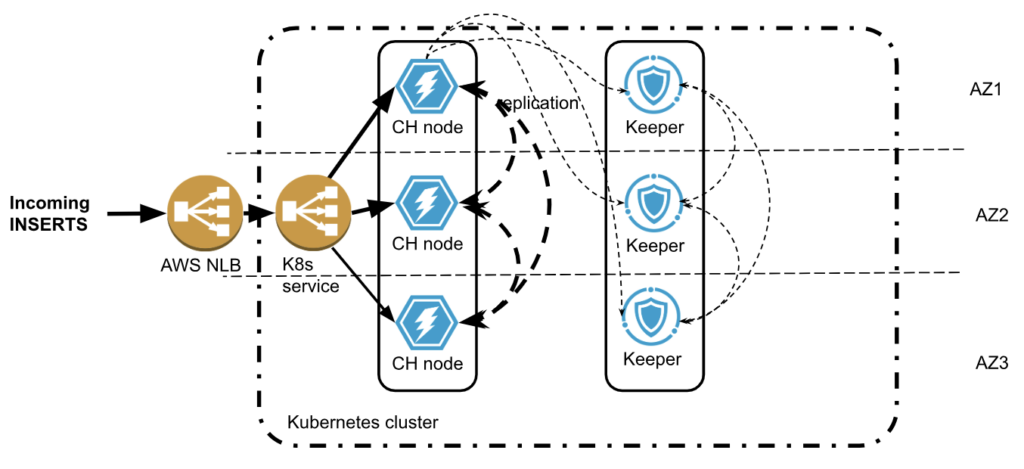
Following multi zone practice, both ClickHouse and Keeper are deployed in multiple availability zones. The new data is being inserted to ClickHouse cluster multiple zone crossings are possible:
- The load balancer accepts traffic in one zone but then may send data to the ClickHouse node in a different zone.
- ClickHouse will replicate data twice to other zones. Replicated data size is usually smaller than incoming rows, thanks to ClickHouse compression, but if there are MVs involved, for example, the replicated data size might even increase.
- ClickHouse also communicates with Keeper, which has a 66% chance of being in a different zone. Traffic between ClickHouse and Keeper is usually small, but in rare cases may be significant.
- Keeper will replicate its state twice between zones.
Some zone crossings are unavoidable. Others can be optimized. Is it worth the effort?
AWS will charge you $0.01/GB for all cross-zone network transfers! That does not seem too much. You may get a bit surprised to learn that it is charged twice: $0.01/GB on ingress (instance receiving data) and $0.01/GB on egress (instance sending data)! So if one ingests tens of TB of data per day, that is pretty typical for ClickHouse, that may result in several hundred dollars network costs every day! Other cloud providers follow the same approach.
Let’s look at a few techniques that help to reduce billable network traffic in such deployments.
Compressing Incoming Data
ClickHouse supports protocol level compression on both main protocols HTTP and TCP. However, it is usually disabled by default on the client side. Turning on compression may significantly reduce the size of incoming traffic. Check client documentation how to turn it on, e.g., in clickhouse-go or in Python clickhouse-driver.
When using HTTP protocol, incoming data format is also important. While JSON is a convenient option nowadays, binary formats like Parquet and Native ClickHouse provide much more compact data representation and may not require protocol compression at all.
Zone Aware Load Balancing
Load balancers are typically multi-zone. The default configuration is to do a round-robin between connected application services. It gets even more complicated with managed Kubernetes, because there are two load balancers: one from the cloud provider, and another one inside the Kubernetes. This results in two cross-AZ hops.
Cloud Load balancer traffic first lands on any EKS node with open NodePort. Then it gets routed to Kubernetes LoadBalancer service and then to the target pod that may reside on a different node in a different AZ (and usually does). Here is a picture that shows network connections:
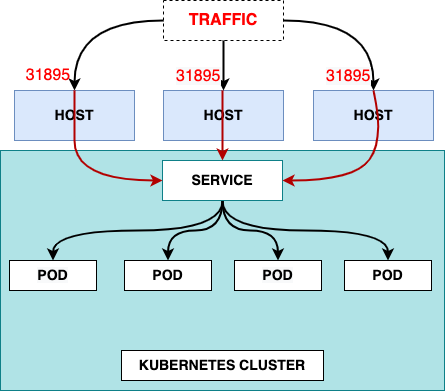
Picture from https://www.infraspec.dev/blog/setting-up-ingress-on-eks/
It is tempting to configure the LoadBalancer service so it will send traffic to the node in the same zone, if one is available. However, Kubernetes does not have such a capability. In Altinity.Cloud, we do it using our edge proxy load balancer that we developed (and which is going to be released in open source). It serves as a generic service for all Kubernetes workloads, and routes to an appropriate ClickHouse node in the same zone, if possible.
This approach may reduce the network costs on incoming traffic, but there is a caveat. If the traffic source is also in the cloud and deployed in a single zone, then all inserts will land on a single ClickHouse replica resulting in uneven load. Most application designs want to avoid this.
Zone Aware Connections To Keeper and ZooKeeper
The problem of network costs quickly becomes apparent for everybody who operates ClickHouse deployments at scale. For this reason, ClickHouse developers added support to ClickHouse server itself in order to minimize cross zone connections to Keeper or ZooKeeper.
In order for ClickHouse to connect to Keeper in the same zone, ClickHouse should:
- Know in which zone the current ClickHouse process is running
- Know zones for every host in Keeper cluster
- Match them together when connecting
Let’s explain how it can be done.
Configuring ClickHouse
ClickHouse zone awareness is configured in the <placement> section of server configuration. It supports three modes to specify availability zones:
- Using Instance Metadata Service (IMDS)
Instance Metadata Service, or IMDS, allows applications running in the cloud to extract cloud related metadata, including location information like region or availability zone.
For ClickHouse, it can be configured as follows:
<placement>
    <use_imds>true</use_imds>
</placement>
Depending on the cloud provider ClickHouse would access metadata as follows:
- AWS: IMDSv1-style HTTP GET to http://169.254.169.254/latest/meta-data/placement/availability-zone (or IPv6 if env overrides). No IMDSv2 token is requested; IMDSv2-only hosts will fail detection.
- GCP: HTTP GET to http://169.254.169.254/computeMetadata/v1/instance/zone with header Metadata-Flavor: Google; parses the final segment (e.g. projects/123/zones/us-central1a → us-central1a).
- Azure IMDS lookup is not yet supported by ClickHouse
This approach has limitations, since IMDS services are often disabled for security reasons. If you are curious to learn more, here is some useful information about IMDS in AWS, in GCP and in Azure.
- Using explicit zone placement
This is the most direct and transparent way to specify a zone for ClickHouse server.
<placement>
    <availability_zone>us-east-1a</availability_zone>
</placement>
This works in all setups but requires infrastructure automation in order to specify a proper zone for every ClickHouse host. If you are a happy user of the Altinity Kubernetes Operator for ClickHouse, you can use replica specific configurations in CHI resources.
 configuration:
   clusters:
   - layout:
       replicas:
       - settings:
           placement/availability_zone: us-east-1a
       - settings:
placement/availability_zone: us-east-1b- Using availability zone from a file
Finally, Clickhouse can read zone information from a file. This approach can be useful, if the file is mapped to an external resource that provides zone information:
<placement>
    <availability_zone_from_file>...</availability_zone_from_file>
</placement>
The default path is /run/instance-metadata/node-zone. File contents are trimmed and used as an availability zone. The expected format is a plain text zone name like us-east-1a followed by a newline.
Configuring Keeper
ClickHouse Keeper supports the same 3 ways to detect and configure availability zones.
The configured zone name is published to the /keeper/availability_zone Keeper node and can be retrieved by ClickHouse or looked up by a user if needed. You can find the current connection using a SQL query to the system.zookeepers table as shown below.
SELECT * FROM system.zookeepers
WHERE path = '/keeper/availability_zone'
Configuring ZooKeeper
Unlike Keeper, Zookeeper does not support zone detection mechanisms. However, zones can be specified explicitly when configuring ZooKeeper clusters in ClickHouse server configuration. The same can be done for Keeper as well.
<zookeeper>
    <node index="1">
        <host>keeper-a</host>
        <port>9181</port>
        <availability_zone>us-east-1a</availability_zone>
    </node>
    <node index="2">
        <host>keeper-b</host>
        <port>9181</port>
        <availability_zone>us-east-1b</availability_zone>
    </node>
    <node index="3">
        <host>keeper-c</host>
        <port>9181</port>
        <availability_zone>us-east-1c</availability_zone>
    </node>
</zookeeper>
The configuration is static after creating ZooKeeper or Keeper clusters, so it is fairly easy to configure.
Linking Everything Together
The last step is to instruct ClickHouse to connect Keeper or ZooKeeper in the same zone.
<zookeeper>
    <!-- Prefer same-AZ Keeper, fall back to others -->
    <prefer_local_availability_zone>true</prefer_local_availability_zone>
    <!-- Optional: fetch AZ from Keeper’s /keeper/availability_zone when not set explicitly -->
    <availability_zone_autodetect>true</availability_zone_autodetect>
    <!-- Optional: explicit load balancing if desired -->
    <!-- <keeper_load_balancing>first_or_random</keeper_load_balancing> →
</zookeeper>
In order to validate if zone aware connectivity works properly, use system.zookeeper_connection table. It displays connection to an appropriate zookeeper or keeper host as well as zone information if available.
The zone aware connection is preferred but it may fail over to another host, if a host in a desired zone is not available, e.g. restarted. In order to make sure that connections eventually will be properly distributed, there is a fallback configuration:
<zookeeper>
    ...
    <fallback_session_lifetime>
        <min>600</min>   <!-- seconds -->
        <max>1800</max>  <!-- seconds -->
    </fallback_session_lifetime>
</zookeeper>
Default values are 3 and 6 hours respectively.
Zone aware ClickHouse to ZooKeeper configuration is deployed by default in Altinity.Cloud.
Zone Aware Connections To Kafka
It is quite common for ClickHouse to pull data from Kafka. Thanks to the Clickhouse Kafka engine it is very easy to set up. Kafka brokers are typically multi zone, so it makes sense to configure zone aware connections there as well. Kafka developers call it “rack awareness”. Most brokers, including managed brokers like MSK, have rack awareness configured on a broker level already. So the client library can fetch the rack ids from the broker and connect to the preferred rack.
In ClickHouse, preferred rack for Kafka consumers can be configured as follows:
<kafka>
    <client_rack>my-rack-1<client_rack/>
</kafka>
The challenge is to find the mapping between racks and zones. Please refer to the appropriate Kafka provider documentation for details. Here are the instructions for AWS MSK.
Conclusion
Multiple availability zones are a standard requirement for high availability. It originated from the 80s or 90s, when datacenters were small and not very reliable, and public datacenters did not exist. Since then, AWS, GCP and Azure have built dozens of giant datacenters all around the world. The electricity and networking became much more reliable than it used to be 30 years ago, so the availability zone failures are rare. On the other hand, deploying applications in multiple availability zones generates high network costs.
We have explained several techniques to reduce those network costs for ClickHouse applications. However, the discussion also brings up an important question. Do ClickHouse applications even need multiple availability zones? The answer is somewhat surprising. We will explore it in the next article. Stay tuned!
ClickHouse® is a registered trademark of ClickHouse, Inc.; Altinity is not affiliated with or associated with ClickHouse, Inc.