
The Antalya Playground and ClickHouse® Demo Apps
Last year, Project Antalya arrived, integrating ClickHouse with Iceberg data lakes to bring low-cost object storage to real-time analytics. Now you can try out these features yourself in the new Antalya Playground. From your browser, launch a SQL interface and start writing queries against a public cluster loaded with popular datasets including OnTime and NYC taxi data. Antalya features such as Iceberg tables, swarm clusters, and hybrid tables are all available to try.
A couple of demo applications built on ClickHouse and Project Antalya are also available:
- The Altinity SQL Browser, a feature-rich SQL interface gated by OAuth login.
- The NYC taxi demo, a dashboard that queries live data through API endpoints without exposing raw SQL queries.
Both applications are hosted as static sites directly through a ClickHouse cluster on Altinity Cloud, so no extra deployment is needed. Below, we’ll walk through the playground and both demo applications, then show how to set up your own playground environment and demo apps yourself.
What’s in the Playground
The Antalya playground is a public ClickHouse cluster running Project Antalya with popular datasets loaded, and a suite of demo applications built on top.
The following MergeTree tables are available:
ontime.fact_ontime– On-time performance for flights on US domestic airlines from 1987 to 2025 (200 million rows).tripdata.taxi_trips– Records of taxi rides in New York City from 2009 to 2024 (1.82 billion rows).tripdata.fhv_trips– Records of for-hire vehicles/rideshare trips in New York City from 2015 to 2024 (1.77 billion rows).
These tables are also available in Iceberg via the ice database, such as ice.`tripdata.taxi_trips`. Iceberg tables are stored as Parquet files in S3, ideal for low-cost storage of historical data.
You can query these tables with the simple /play SQL interface built into ClickHouse. Take the database for a spin! (If you’d like some ideas, the Antalya Playground docs have a number of interesting queries that put Antalya through its paces.)
Antalya Features in Action
Let’s try a query on the OnTime dataset and compare performance across MergeTree, Iceberg, and Hybrid tables. The following query calculates the on-time percentage for all flights from 2019 for the four largest US airlines:
SELECT
    Carrier,
    round(100 * countIf(ArrDel15 = 0) / count(), 1) AS on_time_pct
FROM ontime.fact_ontime
WHERE Year >= 2001 AND Carrier IN ('WN', 'AA', 'DL', 'UA')
GROUP BY Carrier ORDER BY on_time_pct DESC
(Note: WN = Southwest, AA = American, DL = Delta, UA = United)
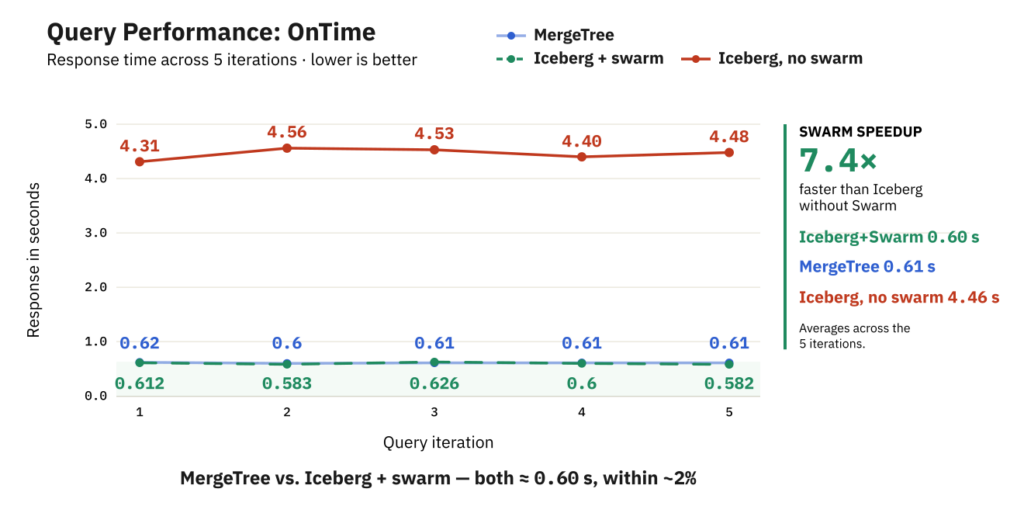
On Mergetree, the average query time across 5 runs is 0.61 seconds. This involved processing 160 million rows. The query output is shown in the following table:
   ┌─Carrier─┬─on_time_pct─┐
1. │ DL      │        83.7 │
2. │ WN      │        81.3 │
3. │ UA      │        80.5 │
4. │ AA      │        79.5 │
   └─────────┴─────────────┘
Now, let’s try the same query on Iceberg data. We use FROM ice.`ontime.fact_ontime` to point to the Iceberg table (backticks included):
SELECT
    Carrier,
    round(100 * countIf(ArrDel15 = 0) / count(), 1) AS on_time_pct
FROM ice.`ontime.fact_ontime`
WHERE Year >= 2001 AND Carrier IN ('WN', 'AA', 'DL', 'UA')
GROUP BY Carrier ORDER BY on_time_pct DESC
This results in an average time of 4.46 seconds across 5 runs. Since querying Iceberg involves reading Parquet files across the network in S3, a slower time here is expected.
However, we can speed up our Iceberg query significantly by using Antalya swarm clusters, which are stateless ClickHouse servers that can query Iceberg in parallel. They can quickly scale up or down, since compute is separated from storage.
To use the swarm, we simply append SETTINGS object_storage_cluster = 'swarm' to the query:
SELECT
    Carrier,
    round(100 * countIf(ArrDel15 = 0) / count(), 1) AS on_time_pct
FROM ice.`ontime.fact_ontime`
WHERE Year >= 2001 AND Carrier IN ('WN', 'AA', 'DL', 'UA')
GROUP BY Carrier ORDER BY on_time_pct DESC
SETTINGS object_storage_cluster = ‘swarm’
The average time with swarms drops to 0.6 seconds. The swarm used for this test only had two nodes with 8 vCPUs each. Larger swarms improve Iceberg query performance even more.
The following chart shows the results of all three tests. This shows that with swarms, our query achieves MergeTree-level performance on Iceberg data.
The Demos
The following demo apps built on the playground are available to try:
Altinity SQL Browser
For a more advanced SQL interface connected to the same Antalya playground environment, try the Altinity SQL Browser. It uses the new OAuth feature in Antalya builds, allowing any Google account to log in and receive a read-only ClickHouse role.
Once logged in, the browser interface contains many features to help you explore your data. You can:
- Visualize query results in a chart (bar graph, pie chart, etc.).
- Import and export sets of queries and charts as a library in JSON format, making it easy to share.
- Stream results straight to a file when you have a query with a trailing
FORMAT Parquet/CSV/JSONEachRow… clause. - An “Explain” tab shows the query plan generated by ClickHouse, including a graph visualization.
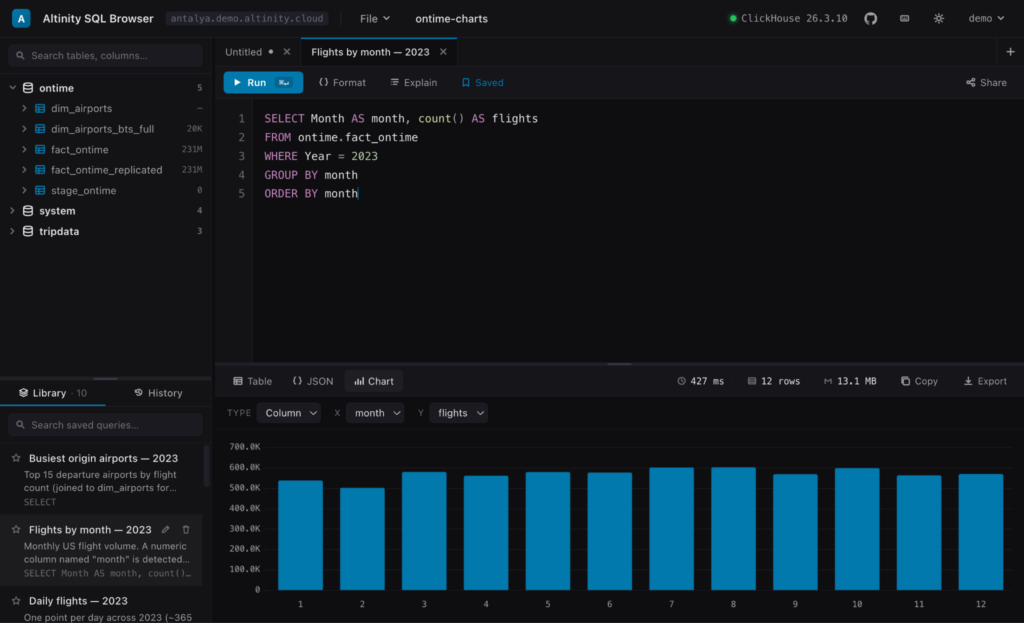
The Altinity SQL Browser is easy to set up locally or hosted directly on any ClickHouse server. The Antalya playground server contains a single HTML file hosted directly through ClickHouse user files served with HTTP handler configs.
Check out the SQL Browser repo for the source code and detailed instructions for deploying it on your own clusters.
NYC Taxi Demo with API Endpoints
The NYC Taxi Demo is an interactive dashboard that queries live data from the Antalya playground using API endpoints.
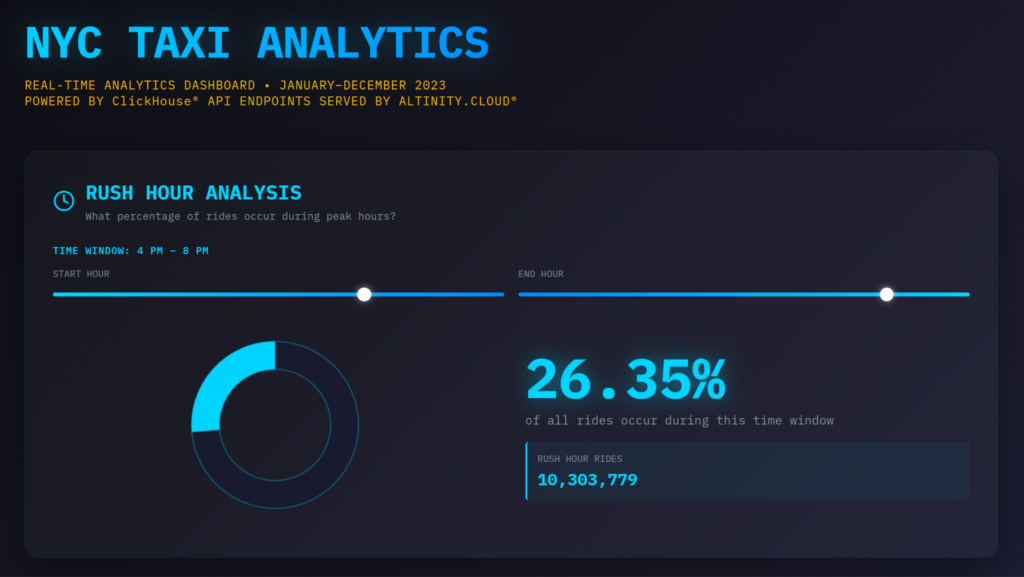
This graphic shows the percentage of all taxi rides that occur during certain hours of the day. Moving the sliders sends a request to ClickHouse for the data to update the visualization.
Instead of sending raw SQL statements, the app queries a simple endpoint such as antalya.demo.altinity.cloud/rush-hour. Each endpoint maps a URL to a SQL statement, with configurable parameters through the query string, such as /rush-hour?start_time=16&end_time=20.
The benefit is that applications don’t need to know anything about the structure of the database, and changing the underlying query later is simple. Since our playground is running on Altinity Cloud, the API endpoints were easily created in the ACM (Altinity Cloud Manager).
The demo webpage is hosted directly through ClickHouse just like the Altinity SQL Browser. Check out the Altinity examples repo for the source code and instructions on how to deploy the taxi demo to a ClickHouse cluster in Altinity.Cloud.
Setting Up Your Own Playground
Setting up your own playground environment on Altinity.Cloud, with the same features and data as the public one, is documented step by step in the altinity-playground repository. Before setting up, you’ll need an Altinity.Cloud account (or sign up for a free trial).
Once you have an Altinity.Cloud account, setting up the environment consists of:
- Using Terraform to create the environment on AWS
- For other cloud providers, view the docs on Azure, GCP, and Hetzner environment setup with Terraform.
- This setup runs Altinity.Cloud in your own cloud account (BYOC). You can also run Altinity.Cloud fully managed (SaaS) in our cloud account or your own Kubernetes environment (BYOK)
- Creating a ClickHouse cluster via the ACM (select an Antalya build)
- Enabling the Iceberg catalog in the ACM
- Loading the datasets:
Conclusion
The Antalya Playground is a great way to try out Project Antalya features on Altinity’s public ClickHouse cluster. It has popular datasets loaded in both MergeTree and Iceberg tables, plus Hybrid tables that allow you to query both at once. Or use the swarm cluster to see how scalable compute can make querying Iceberg data fast.
On top of the playground, we introduced hands-on demos like the Altinity SQL Browser and the NYC Taxi Demo with API Endpoints. These open-source apps are easy to deploy directly inside ClickHouse, no external server needed.
For those that want to dig deeper, we made it easy to set up your own playground from scratch with the same datasets and demo apps in Altinity.Cloud. If you have questions, please contact us at Altinity or join the discussion on our Slack channel.
ClickHouse® is a registered trademark of ClickHouse, Inc.; Altinity is not affiliated with or associated with ClickHouse, Inc.