
OAuth Alert! Token-based Authentication Lands in Altinity Antalya Builds
TL;DR: If your organization already uses Keycloak, Entra, Okta, or another OIDC provider, Altinity Antalya 26.3 can connect ClickHouse® to it without shared passwords or manual user sync. Configure a token processor, map IdP groups to ClickHouse roles, and send short-lived Bearer tokens. ClickHouse supports JWT and opaque tokens; with a token user directory, valid IdP users can get temporary sessions without local accounts. Revocation and group changes take effect on token revalidation, subject to caching. Token authentication first shipped in Antalya 26.1 and is GA and enabled by default in 26.3.
Until now, open-source ClickHouse offered two options for user management: configuring users manually (in server configuration files or via SQL), or pointing ClickHouse at LDAP for user definitions. Both work well for the right environment, but neither is simple – and in practice, people end up relying on shared service account credentials. That creates its own problems: rotation is painful, access control is coarse-grained, and when something goes wrong it’s hard to tell who actually did what.
Native token-based authentication first shipped in Altinity Antalya 26.1; with Altinity Antalya 26.3 it’s officially GA. If your organization already uses an identity provider – Keycloak, Entra, Okta, or any OIDC-compliant system – ClickHouse can now plug directly into it. Services and users authenticate with short-lived tokens issued by your Identity Provider. No shared passwords, no manual user sync.
This article introduces token-based authentication in Antalya builds. Our audience is mainly ClickHouse administrators who need to connect ClickHouse to an existing identity provider.
TL;DR
OAuth lets you manage ClickHouse access the same way you manage everything else in your organization — through a central identity provider, with short-lived tokens instead of shared passwords. Antalya brings that model into ClickHouse: configure a token processor for your IdP, map groups to roles, and clients from Grafana dashboards to clickhouse-client can authenticate with tokens they already have.
The payoff is practical as well as architectural. Access is tied to real users and services, revocation flows through the IdP, and you stop maintaining a parallel user list in users.xml. Token auth is enabled by default in 26.3, supports major IdPs and both JWT and opaque tokens, and is ready for production use.
What is OAuth?
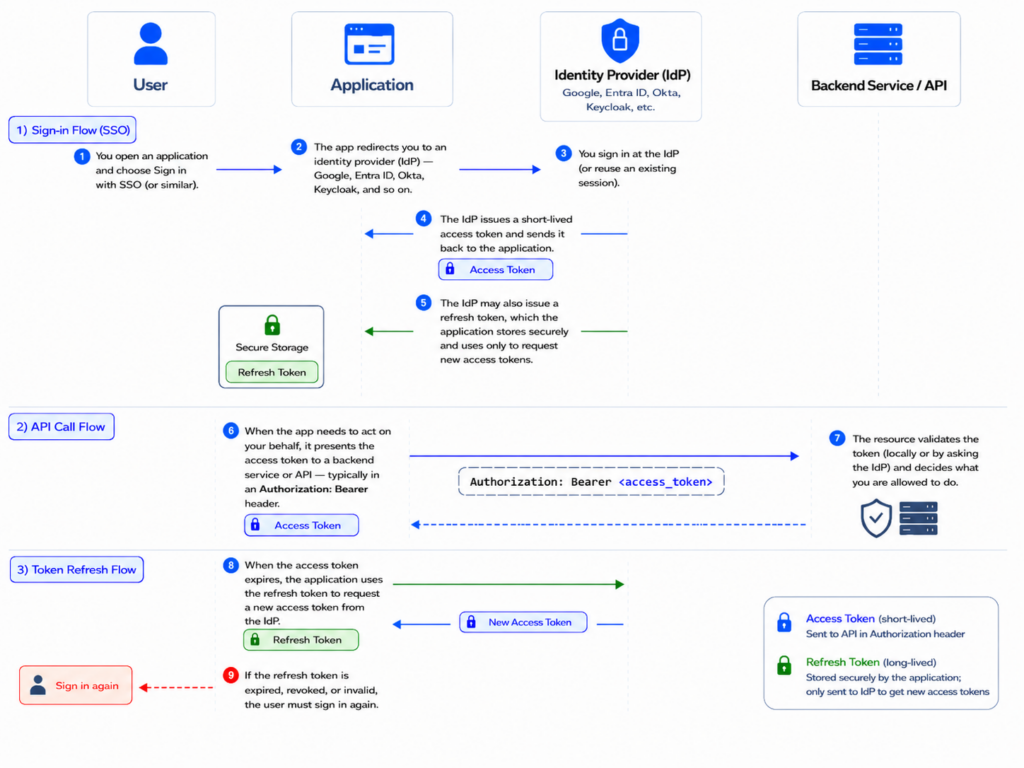
OAuth is a standard way to outsource identity verification — an application lets a trusted identity provider handle user management instead of doing it itself.
In general, the workflow is the following:
- You open an application and choose Sign in with SSO (or similar).
- The app redirects you to an identity provider (IdP) — Google, Entra ID, Okta, Keycloak, and so on.
- You sign in at the IdP (or reuse an existing session).
- The IdP issues a short-lived access token and sends it back to the application.
- It may also issue a refresh token which is stored securely by the application and never shared with anyone.
- When the app needs to act on your behalf, it presents the access token to a backend service or API – typically in an Authorization: Bearer header.
- The resource validates the token (locally or by asking the IdP) and decides what you are allowed to do.
- When the access token expires, the application uses the refresh token to request a new access token from the IdP.
- If the refresh token is expired, revoked, or invalid, the user must sign in again.
In our case, ClickHouse sits on the receiving end of step 4 — it does not run the login UI or handle the SSO redirect; it validates tokens from IdPs you configure and maps identity to database access.
OAuth vs OIDC. OAuth defines how clients obtain access tokens. OpenID Connect (OIDC) adds a standard identity layer on top that handles authenticating users — usernames, groups, discovery URLs, and so on. Most enterprise IdPs speak OIDC.
JWT vs opaque tokens. Some tokens are JWTs: signed JSON you can verify locally with the IdP’s public keys. Others are opaque: random strings that must be checked against the IdP’s userinfo or introspection endpoint. We support both: the validation path depends on your processor configuration (see the Configuration and Getting Started section below).
What This Actually Solves
The problem isn’t really that passwords are weak. It’s that most companies already run a centralized identity provider — Entra ID, Okta — and then get to ClickHouse and fall back to users.xml or CREATE USER commands and shared passwords (or LDAP, which not everyone runs). Token auth closes that gap. The benefits compound:
- Short-lived credentials by design. Tokens expire — typically in 15 minutes to an hour. A leaked token has a narrow window of usefulness without any action on your part. A leaked password lasts until someone manually rotates it – and you may never notice it was leaked.
- Revocation that works. When an employee leaves or a service is decommissioned, you revoke their access in the IdP. ClickHouse respects it at the next token validation, which happens within minutes (or hours, depending on the IdP and local cache configuration). With password auth, you have to revoke access manually in every system.
- Role mapping from your IdP. Everyone on the analytics team can get analytics-level access, developers can get developer-level access — defined once in your IdP and reflected in ClickHouse automatically.
Use Cases
All the cases mentioned below require proper server-side configuration first (see the Configuration and Getting Started section below).
Grafana and Other BI Tools
Grafana servers have great support for OIDC and OAuth. When a user logs into Grafana through your IdP, Grafana can forward that user’s access token to ClickHouse. ClickHouse validates it and knows which user ran the query — no shared data-source password.
This requires the Altinity ClickHouse Grafana plugin and Grafana configured for SSO with your IdP. Turn on Forward OAuth Identity on the data source; the plugin sends the access token in the Authorization: Bearer header on each query.
The same pattern works for any BI tool that can attach a Bearer token to a query’s HTTP headers.
To try it end-to-end before touching production, see the Altinity/oauth-examples repo — a collection of set-up examples for different use cases.
Enterprise SSO for Analysts and Developers
For people who query ClickHouse directly (i.e. using clickhouse-client), token auth enables true single sign-on. An analyst authenticates to Keycloak (or Okta, or any other OIDC provider), gets a token, and passes it to ClickHouse.
In the simplest case, when you already have a token in hand (e.g. issued by a script or a CI job), pass it through directly:
clickhouse-client --jwt "$TOKEN"
If you do not yet have a token, but you have an executable script or command that returns one, pass that command to clickhouse-client instead:
clickhouse-client --jwt-command "<executable>"
For interactive use, clickhouse-client can drive the OAuth flow itself – there’s no need to script a token-fetcher around it:
# Opens a browser, completes Authorization Code + PKCE against your IdP
clickhouse-client --host clickhouse.example.com --login=browser --oauth-credentials ~/idp.json

# Headless / SSH session: prints a URL and a short user code,
# you approve from a phone or another machine
clickhouse-client --host clickhouse.example.com --login=device --oauth-credentials ~/idp.json
The credentials file is a small JSON document describing your OIDC client: client_id, auth_uri, token_uri, plus optional client_secret (for confidential clients) and device_authorization_uri.
Sample configuration for Device Flow:
{
   "installed": {
       "client_id": "<your client id>",
       "project_id": "...",
       "auth_uri": "...",
       "token_uri": "...",
       "auth_provider_x509_cert_url": "...",
       "client_secret": "<your secret>"
   }
}
To use Redirect Flow which redirects users to a browser for authentication, add a redirect_uris field to the configuration above:
"redirect_uris": [<your URLs>]
After a successful login, the refresh token is cached at ~/.clickhouse-client/oauth_cache.json. Subsequent runs reuse it silently, and only re-prompt once it stops working.
Whichever way the token arrives, ClickHouse reads it, extracts the username and group memberships, and creates a temporary user with the right roles — without that user being explicitly defined locally. When a user’s group memberships change in the IdP, their ClickHouse permissions catch up at the next token validation — i.e. when the cached entry expires (see Caching below).
Configuration and Getting Started
Token authentication is enabled by default in Antalya 26.3. As an administrator, you need three pieces in place:
- A token processor in config.xml — tells ClickHouse how to validate tokens and extract actual user information from them
- Optionally, a way to map externally defined users to ClickHouse users — usually a <token> user directory
- Clients configured to send Authorization: Bearer tokens (Grafana, services, CLI)
The sections below walk through each step.
Processor Types
A token processor is the piece of configuration that knows how to talk to one specific IdP. Given an incoming token — usually just a cryptic-looking string — it turns that string into the bits ClickHouse actually needs: who the user is, which groups they belong to in the IdP, and how long the token stays valid. You can define more than one in the server configuration; the main setting on each is the type:
- Static key (
jwt_static_key) — for simple cases where you control token issuance and can share a symmetric signing key with ClickHouse - Static JWKS (
jwt_static_jwks) — for environments with a locally pre-defined JSON Web Key Set that is not changed dynamically - Dynamic JWKS (
jwt_dynamic_jwks) — ClickHouse fetches and caches the JWKS from the IdP’s published endpoint (often.well-known/jwks.json) and handles key rotation automatically - OpenID Connect (
openid) — for Keycloak, Google, Okta, Auth0, or any OIDC-compliant provider. The shortest path is to pointconfiguration_endpointat the IdP’s discovery URL (usuallyhttps://<idp>/.well-known/openid-configuration) and let ClickHouse pull everything from it. You can also wire upuserinfo_endpoint,token_introspection_endpoint, andjwks_urimanually instead. - Entra ID (
entra) — a preset for Microsoft Entra ID. The only required parameter here istenant_id.
Here’s an example of a minimal OpenID set-up for Keycloak:
<token_processors>
    <keycloak>
        <type>openid</type>
        <configuration_endpoint>
            https://keycloak.example.com/realms/myrealm/.well-known/openid-configuration
        </configuration_endpoint>
    </keycloak>
</token_processors>
And that’s it.
Dynamic Users From Your IdP
You do not have to pre-create ClickHouse users. ClickHouse can treat your IdP as an external user directory: anyone who presents a valid token from a configured processor gets a session, with roles derived from token claims (or from the IdP response for opaque tokens):
<user_directories>
    <token>
        <processor>keycloak</processor>
        <common_roles>
            <clickhouse_reader />
        </common_roles>
        <roles_filter>\bclickhouse-[a-zA-Z0-9]+\b</roles_filter>
        <roles_transform>s/-/_/g</roles_transform>
    </token>
</user_directories>
When a user authenticates:
- ClickHouse pulls their group memberships from the token,
- Keeps the ones matching
roles_filter(an optionally defined regular expression), - Runs them through
roles_transform. It is a sed-like expression, so you can define arbitrary rewrites: for example, convertclickhouse-adminintoclickhouse_admin, - Grants the resulting roles for the session.
Caching
How a token is validated depends on its kind. JWTs are decoded and verified locally against the IdP’s public keys when possible. For jwt_dynamic_jwks (and openid when a JWKS is exposed), the key set itself is fetched once and refreshed on a schedule (jwks_cache_lifetime, default one hour) — so in steady state, queries almost never hit the IdP at all.
Opaque tokens validated via userinfo/introspection endpoints do have to be checked against the issuer. ClickHouse caches the result of that check per token, so the IdP isn’t hit on every query either.
In both cases a validated token is held for min(token_expiry, token_cache_lifetime), defaulting to one hour.
Optional: Bind Existing users.xml Accounts
You can set up token authentication for users defined in users.xml by replacing their password (or other authentication method) block with a <jwt> section:
<users>
    <analyst>
        <jwt>
            <claims>{"department": "analytics"}</claims>
        </jwt>
    </analyst>
</users>
Both the --jwt CLI flag and the <jwt> element keep that name for compatibility with upstream open-source ClickHouse, where this path originally handled JWTs only. In Antalya, the same mechanism accepts any token your configured processor can validate.
The claims field acts as an extra authorization check: ClickHouse verifies that the token contains the specified claims, and rejects it for this user otherwise.
The check only fires for JWTs — the jwt_* processors, or openid when a JWKS is configured. For opaque access tokens (Google, or OpenID via userinfo/introspection), ClickHouse never sees a signed JWT body, so the filter has nothing to match against and is skipped.
A full configuration reference and more examples can be found in the Antalya documentation.
Availability
Token authentication is generally available in Altinity Antalya 26.3. It first shipped in 26.1 and has been available in every Antalya release since.
Summary
Altinity Antalya’s support for token authentication lets you manage access to your ClickHouse server through any OIDC-compliant identity provider. You can define groups in your IdP, then map those groups directly to roles in ClickHouse. If credentials are leaked, their short lifespan limits the damage they can cause, and revoking a user’s access at the IdP revokes it in ClickHouse and any other applications that use that IdP. To get started, take a look at the Altinity/oauth-examples repo or the full configuration reference.
Appendix: Glossary
- SSO — Single Sign-On. A login model where users authenticate once through the organization’s IdP and reuse that identity across multiple systems.
- Bearer token — A token that grants access to whoever presents it. Clients send it as
Authorization: Bearer <token>. - Claims — Fields inside a token that describe the user or service, such as username, email, groups, roles, or expiration time.
- JWKS — JSON Web Key Set, a JSON document containing a set of public keys exposed by an IdP, used to verify signed JWTs.
- Userinfo endpoint — An endpoint that returns information about the user associated with a token.
- Token introspection — A request to the IdP to check whether a token is valid and what identity it represents.
External Links
- OAuth 2.0 Standard: https://datatracker.ietf.org/doc/html/rfc6749
- JSON Web Key (JWK): https://datatracker.ietf.org/doc/html/rfc7517
- Altinity’s collection of sample set-ups for token-based auth in ClickHouse: https://github.com/Altinity/oauth-examples/tree/master
- Altinity’s documentation for token-based auth in ClickHouse: https://docs.altinity.com/altinityantalya/integrating-oauth/
ClickHouse® is a registered trademark of ClickHouse, Inc.; Altinity is not affiliated with or associated with ClickHouse, Inc.