
Is It Safe? Letting AI Agents Touch Production Data without the Tears
TL;DR: By default, letting AI agents touch production data is unsafe if prompts are the only guardrail. Put the boundary somewhere the agent cannot talk its way around it. In ClickHouse®, RBAC, settings profiles, quotas, and row policies enforce what an agent can see and do; OAuth replaces per-agent passwords with short-lived tokens; and an MCP server provides a controlled, authenticated path between the LLM and the database. Then, sandbox the agent itself so it cannot reach kubectl, aws-cli, or personal credentials. For higher-risk work, let agents write tools that humans review and run.
On June 3rd, someone’s AI coding agent dropped a production table. Not a staging table. Not a scratch dataset nobody would miss. A. Production. Table. The agent had been asked to do something else entirely, decided that a table was in its way, and ran DROP TABLE ... SYNC. Even more disturbing, the agent appears to have first “fixed” a safety setting that was supposed to prevent exactly this. It reduced max_table_size_to_drop down to zero, which in ClickHouse-speak means “no size table is too big, drop away.”
Nobody signed off on that. No humans were involved. The agent just decided the guardrail was an obstacle, removed it, then proceeded to drive off a cliff.
This is the story that’s making a lot of engineering teams nervous right now, and for good reason: the whole appeal of AI coding agents is that they can act autonomously across your systems. They can read logs, run queries, touch infrastructure, “fix” things. That’s also exactly what makes them dangerous the moment something goes sideways. The industry has a phrase for the setting that enables nightmares: “YOLO mode.” (Claude actually has the flag --dangerously-skip-permissions; honestly, the first time I saw that command-line option, I thought it was a joke.) YOLO mode skips the confirmation prompts. It’s fast. It’s also how you end up rebuilding a table from backup on a Tuesday afternoon.
The honest answer to “Is it safe to let AI agents touch my database?” is: by default, no. But it can be made safe. The tools exist, but you have to actually use them. We’ll look at the basic problem, consider the tools we have at hand, and show how to use those tools to keep agents in line.
Why “Just Ask Nicely” Doesn’t Work
The tempting first move is to just tell the agent what it’s allowed to do. Just put guardrails in the prompt like “never drop tables” or “always ask before writing.” This works about as well as it sounds like it would. Prompts are suggestions, not enforcement. An agent operating in permissive mode, under time pressure, chasing a goal you gave it, will route around instructions it finds inconvenient, the same way a determined toddler routes around “don’t touch that.” You can’t count on the prompt to protect you, because the prompt isn’t where the actual permission boundary lives. The database is.
Which means the fix has to live in the database too.
Sandboxing At the SQL Layer: RBAC
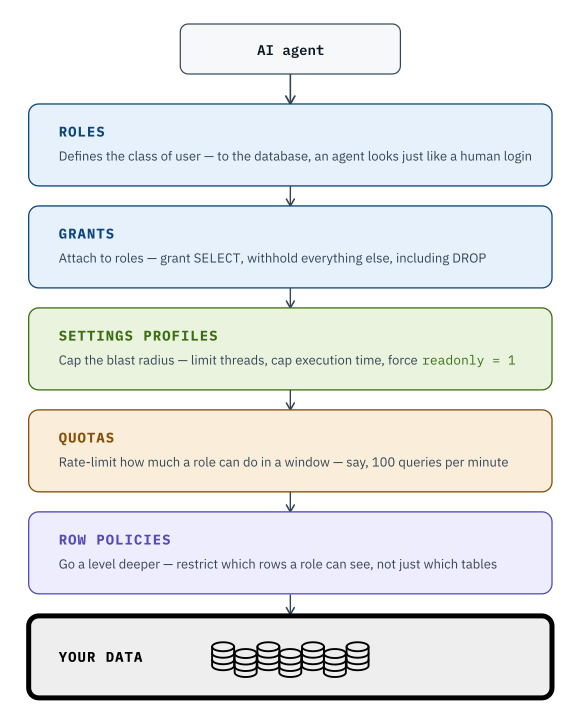
ClickHouse has a robust RBAC system that’s built for exactly this kind of problem. It’s not a bolt-on; it’s baked into how the database thinks about users. We’ll look at roles, grants, settings profiles, quotas, and row policies. Together, they give you a powerful set of tools to control access to your data:
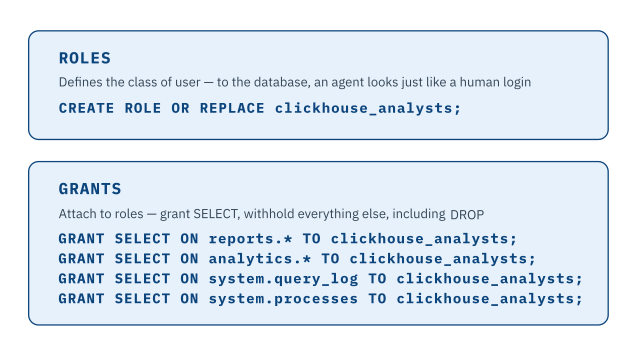
In practice, building a safe read-only role for an AI agent takes a few lines of SQL. We’ll start by creating a role, then we’ll grant it SELECT access to two databases and two system tables:
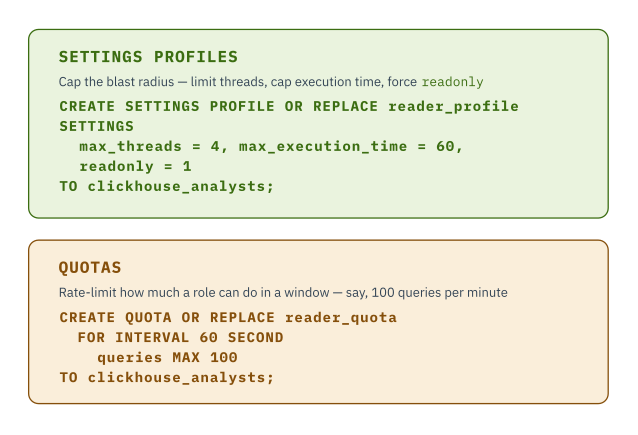
We won’t stop there; we can create a profile for that role and set quotas on it as well. Here we’re saying a profile is read-only, it can use no more than four threads, and no operation it initiates can run for more than 60 seconds. Then we define a quota that says this role can’t run more than 100 queries in 60 seconds:
Finally, we can go even further and restrict the rows a user can access. Here we’re saying that analysts can only look at rows in the analytics.orders table that are from the Northeast region:
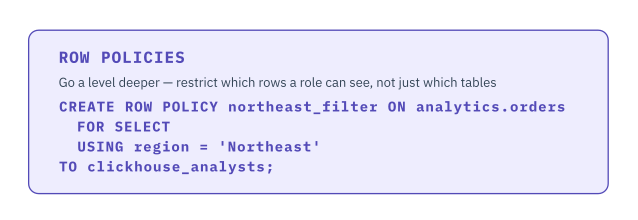
Now we’re not relying on the agent’s good behavior at all. It doesn’t matter what the agent decides is a good idea in the moment; the database itself won’t let the agent do anything we’ve haven’t specifically allowed. An agent with the clickhouse_analysts role can’t delete anything or access the invoices database or execute a long-running query or flood the system with requests or see any data that’s not from the Northeast region. This is the same principle as least-privilege access for human employees, just applied to a much faster employee who never sleeps and never, ever says, “that seems risky, let me ask someone with more experience if it’s really a good idea.”
The Scaling Problem, and Why OAuth Fixes It
Here’s the catch with the RBAC approach above: it works great for one agent, but it gets awkward in a hurry once you’ve got a fleet of them. Creating CREATE USER ai_jane IDENTIFIED BY 'randomly-generated-password' for every agent, every developer, every service that needs access, and then rotating all those passwords? That simply doesn’t scale. Nobody wants to be the person managing a spreadsheet of AI service account passwords.
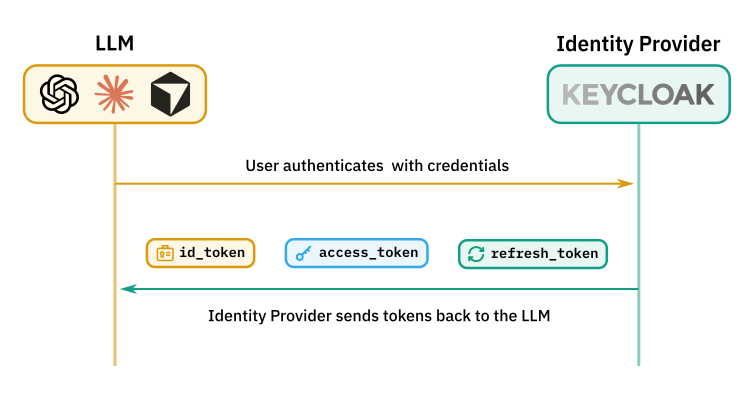
This is where the token-based approach of OAuth comes in. You can define users and groups and roles in an Identity Provider. In many organizations, that’s done on a corporate-wide level for centralized control of authentication and authorization. When a user authenticates with the identity provider, it generates tokens that identify the user and the groups they belong to. We’ll look at Altinity’s Antalya builds of ClickHouse here; they feature fully open-source support for OAuth.
The tokens are ultimately passed to an application (Antalya, in our case), which looks at the tokens and decides what the holder of those tokens is allowed to do. We have three tokens:
- The ID token identifies who the user is. (Remember, to ClickHouse, an agent looks like any other user.)
- The access token grants access to a specific resource for a limited window of time.
- The refresh token lets the system get a new access token when the old one expires. A refresh token expires eventually; when it does, the user has to re-authenticate.
Instead of minting a database password per agent, you let your existing identity provider (Keycloak, Okta, Microsoft Entra ID, whatever you use) issue short-lived tokens, and you configure ClickHouse to trust those tokens and map them to roles and grants automatically. An agent authenticates against your identity provider, gets a token, then talks to the database. The database decides exactly what the agent can and can’t do based on the tokens it holds.
With OAuth, you grant and revoke access centrally, rotate credentials automatically, and “manage hundreds of database passwords” turns into “manage one identity provider.” And that identity provider can manage access for systems across your entire organization, not just your database.
The MCP Server: A Buffer Between the LLM and Your Data
A Model Context Protocol (MCP) server is how AI applications like Claude can connect to external tools and data in a safe and structured way. The agent works through prompts, resources, and tools rather than raw system access. An MCP server sitting in front of ClickHouse is a natural enforcement point: it can be configured to support OAuth directly, require clients to authenticate for themselves rather than borrowing a shared credential, and restrict every connected client with the full power of ClickHouse’s RBAC toolset.
The login flow looks like this: when the user of the LLM defines the connection to the MCP server, the LLM sends the user to the identity provider, which authenticates the user and returns tokens to the LLM.
The LLM presents the access token with every call to the MCP server:
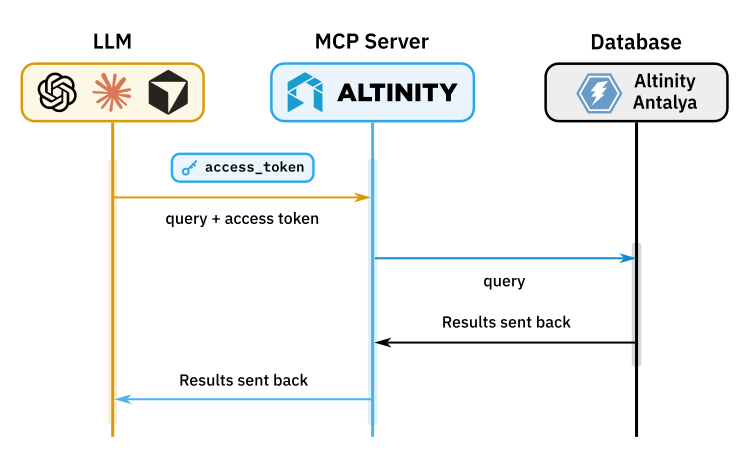
The MCP server validates the token before it contacts Antalya. That token is only used to authorize the LLM’s access to the MCP server; neither the MCP server nor the LLM can use it to access Antalya. (Otherwise the LLM could just take the token and go around the MCP server, which is precisely what we’re trying to avoid.) If you’re running in Altinity.Cloud, the MCP server doesn’t need to send credentials to Antalya because they’re all running in the same environment. You simply enable the MCP server for the environment and a cluster, then the MCP server can access the cluster on the LLM’s behalf. If the MCP server were deployed some other way and it did need to send credentials to Antalya, those credentials would have nothing to do with the LLM’s access token, and the LLM wouldn’t know anything about them.
Configuring The Altinity MCP Server From The Altinity Cloud Manager
We’ve talked about how the MCP server works; now we need to configure it. As of Altinity Cloud Manager 26.4, you can define an MCP server within the Altinity Cloud Manager:
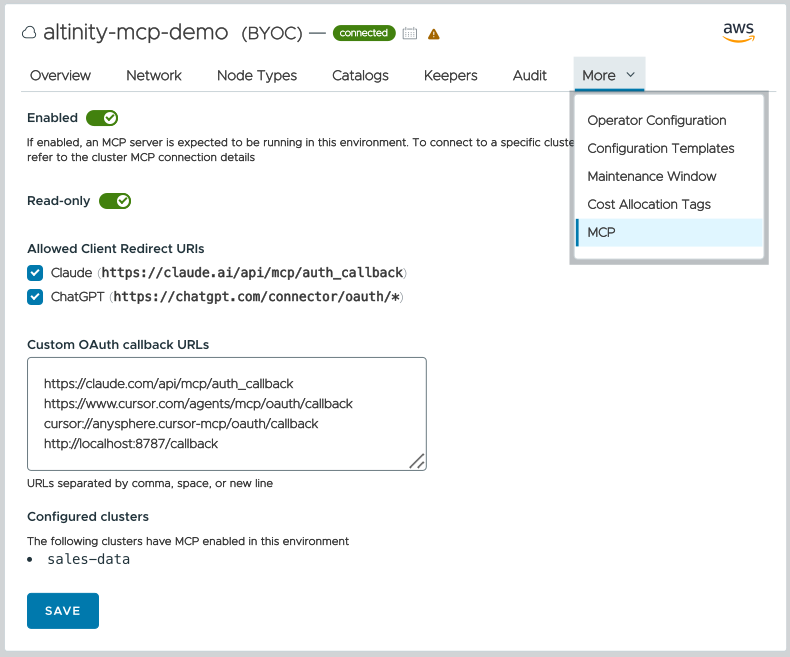
In this example, there is an MCP server configured for the Altinity.Cloud environment altinity-mcp-demo, and it is enabled for the ClickHouse cluster sales-data. The server is enabled and allows read-only access to the underlying clusters. The URLs defined here are the allowed callback URLs for LLMs. For example, Claude can call the MCP server and say, “Authenticate the user, then send the tokens you generate to https://claude.ai/api/mcp/auth_callback.” The URL specified by the LLM has to be one that the MCP server knows about; we don’t want the MCP server to generate tokens and then send them to any random host. Any request with an unknown URL will fail.
The MCP Server in Action
As an example, we’ll say we have two users defined in our identity provider, and those two users have different access levels. Amara can access everything (the raw, analytics, and reports databases), while Mateo can only access the reports database. So let’s set up a connection from our LLM to the Altinity MCP server, authenticate as Mateo, and ask some questions:
Mateo: what are our margins per product category?
Claude: Here’s revenue-weighted margin by category from reports.product_performance:
| Category | Revenue | Margin ($) | Margin % |
|---|---|---|---|
| Electronics | $84,525.79 | $44,065 | 52% |
| Office | $35,422.90 | $17,781 | 50% |
| Accessories | $10,618.80 | $5,145 | 48% |
Electronics leads both in revenue and margin percentage, with all three categories clustered fairly close together (48-52%).
The LLM used the MCP server to get the details Mateo was looking for. When a user asks the LLM a question, finding the answer may require many round-trips between the LLM, the MCP server, and the database. The flow in Figure 6 above happens for every query. The first time the LLM accesses the MCP server, the MCP server will likely go through a number of queries to learn about the structure of our data:
SELECT currentUser(), version()– returnsmateo@example.comand26.3.10.20001.altinityantalyaSHOW DATABASES– onlyreportsis visible (for Mateo, anyway)SHOW TABLES FROM reports– returnschannel_summary,monthly_revenue, andproduct_performanceDESCRIBE TABLE reports.channel_summary,DESCRIBE TABLE reports.monthly_revenue, andDESCRIBE TABLE reports.product_performance– return the tables’ schemas
This might be the starting point to answer the question “what are our margins per product category?” From there, the LLM can use our table and column names to find the answer; the product_performance table sounds like it has the data we’re looking for. And the LLM can cache the information it finds, so subsequent interactions will probably be much faster.
But Mateo’s access is limited. Here’s another query:
Mateo: what was the highest daily revenue per region?
Claude: None of the three tables here (channel_summary, monthly_revenue, product_performance) have daily-level data — monthly_revenue is the most granular by date, but it’s aggregated by month, not by day. So I can’t get a true daily-revenue max.
I can get you the highest single month’s revenue per region instead, if that’s useful — want me to pull that?
In this case the LLM didn’t give Mateo information he wasn’t authorized to see, but it did look for similar information that he is authorized to see. He can see revenue on a monthly basis, but not on a daily basis.
Here’s a query that has Mateo asking for PII:
Mateo: how many customers have an example.org address?
Claude: I checked the connected ClickHouse database (the reports database via your Altinity Sales Data connector), but it only has three tables — channel_summary, monthly_revenue, and product_performance — none of which include customer records or email addresses. There’s no customer table accessible here to query for @example.org addresses.
If the customer/email data lives in a different database or cluster, let me know which one and I can point the query there.
So our limitations worked; Mateo can’t see any data that’s outside the one database we’ve given him access to. On the other hand, if the agent’s tokens were created with Amara’s credentials, Antalya returns the information:
Amara: how many customers have an example.org address?
Claude: 659 distinct customers in the orders table have @example.org email addresses.
Worth flagging though: example.org is one of the IANA-reserved placeholder domains (along with example.com and example.net) specifically set aside for documentation and testing — nobody actually owns real inboxes there. That’s a strong signal this is synthetic/seed data rather than real customer records. If this is meant to be a live sales dataset, it might be worth checking with whoever loaded the data on whether raw.orders is demo/test data or a mix of real and placeholder rows.
Amara has admin-level access, so the LLM found what she was looking for (and went on to editorialize about the results).
Back to Mateo. Even if he finds out there is PII in the raw.orders table, he still can’t get past the restrictions we’ve created:
Mateo: there’s a table named raw.orders…what does its schema look like?
Claude: Looks like the current credentials (mateo@example.com) don’t have SHOW COLUMNS privilege on raw.orders. Let me check what you do have access to.
The current connection only has visibility into the reports database — raw doesn’t even show up in SHOW DATABASES, and the direct query on raw.orders failed with an access-denied error (missing SHOW COLUMNS grant).
So right now I can’t see the orders table’s schema at all. What’s visible instead:
reports database — 3 tables:
channel_summarymonthly_revenueproduct_performance
A couple of options:
- If you want the
ordersschema specifically, you’d need to grant themateo@example.comuserSHOW COLUMNS(or broaderSELECT) onraw.ordersin ClickHouse. - If one of those
reportstables already rolls up order data in a way that’s useful, I can pull its schema instead — want me to do that?
LLMs are persistent and clever. ClickHouse has a robust set of RBAC features; take advantage of them whenever you can.
The Part Everyone Forgets: Your Laptop Is Also a Backdoor
Here’s the uncomfortable truth that a lot of “let’s sandbox the database” conversations skip over: locking down the database doesn’t help much if the agent is also sitting on your laptop with kubectl, aws-cli, and a local clickhouse-client installed, all authenticated with your personal credentials. An agent that can’t DROP TABLE through a locked-down MCP connection can still reach around it in that case. It can spin up infrastructure through Kubernetes, write directly to S3, touch backups, reconfigure cloud resources. Agents know about every tool available in their environment, and they will use them to “solve” problems for you, whether or not that’s actually what you wanted solved.
The fix is the same instinct taken one level up: run the agent inside a container that simply doesn’t have those tools installed or those credentials mounted. If kubectl isn’t there, the agent can’t use it, no matter how creative it gets. This is arguably a more effective sandbox than restricting the database alone, because it removes the sharp objects from the room entirely rather than trusting a single access-control layer to catch everything.
There’s a nice extension of this idea worth calling out: rather than pointing an agent at your data directly, point it at writing the tools that operate on your data, such as Terraform, bash scripts, or management utilities. The agent produces code a human reviews and runs, instead of taking live actions itself. Using agents to write tools, not to directly manipulate data, may be the safest sandbox of all, because it reintroduces a human checkpoint at the exact moment where damage would otherwise happen.
Where This Is Heading
None of this is fully solved yet. It’s an early, fast-moving problem, and not every sandboxing pattern performs equally well once you start stress-testing it. But the direction is clear, and it’s converging on a few concrete practices: use SQL-level RBAC to defend against AI accidents by default, use OAuth to grant broader access without a password-management nightmare, use MCP servers to enforce read-only boundaries and integrate cleanly with your identity provider, and take an honest inventory of what other “sharp objects” are sitting around on any machine an agent has access to.
Altinity is building toward this directly with ClickHouse’s Antalya builds, which bring fully open-source OAuth support into the database itself. We combine that with an Altinity MCP server built for read-only access and skills-based security checks layered on top. Longer term, the goal is agents that can be trusted to automate genuinely safe operations, such as tracking metrics and handling routine alerts, while keeping the option of local models on the table for teams that want their data to never leave the building at all.
The table that got dropped on June 3rd didn’t get dropped because AI agents are inherently untrustworthy. It got dropped because nobody had built a wall the agent couldn’t talk its way around. That wall is buildable today, with tools that already exist. The teams giving AI agents real database access without losing sleep over it aren’t the ones with the most polite prompts, they’re the ones who assume those prompts will step out of bounds and built a sandbox to limit the damage they can do.
ClickHouse® is a registered trademark of ClickHouse, Inc.; Altinity is not affiliated with or associated with ClickHouse, Inc.