---
url: 'https://altinity.com/blog/transforming-clickhouse-into-a-datalake-query-engine-with-antalya-swarms'
title: Transforming ClickHouse® into a DataLake Query Engine with Antalya Swarms
author:
name: Alexander Zaitsev
url: 'https://altinity.com/author/alzaltinity/'
date: '2026-07-20T13:13:07-07:00'
modified: '2026-07-21T04:01:04-07:00'
type: post
summary: Antalya swarms are clusters of stateless ClickHouse servers that can give you real-time query performance for Parquet files and Iceberg catalogs. See how standalone swarms add even more flexibility.
categories:
- Blog
tags:
- antalya
- ClickHouse
- datalakes
- Iceberg
- Parquet
- swarms
image: 'https://altinity.com/wp-content/uploads/2026/07/standalone_swarms.png'
published: true
---
# Transforming ClickHouse® into a DataLake Query Engine with Antalya Swarms
**TL;DR:** Connecting a standalone swarm to your main ClickHouse cluster used to mean running a Gateway server, and that Gateway becomes a single point of failure, needing its own clustering just to stay highly available. We wondered: what if we skip the Gateway entirely and connect straight through the swarm’s load balancer? Turns out we already had the pieces to do it. Using two Antalya settings, `object_storage_remote_initiator` and `object_storage_remote_initiator_cluster`, we tested it against a single-node query (1.3s) and a directly-connected swarm (0.4s). The remote standalone swarm came in at 0.4–0.5s, matching direct swarm speed with no Gateway required.
Altinity’s Antalya builds contain innovative extensions to increase performance, lower cost, and improve security for open source ClickHouse. Antalya swarms are a leading feature, introduced more than a year ago. They provide a scalable compute model for ClickHouse queries over Parquet files or Iceberg catalogs. Swarm clusters separate storage and compute using stateless ClickHouse servers. Recently, in his article [Data Lake Query Acceleration using Standalone Antalya Swarms](https://altinity.com/blog/data-lake-query-acceleration-using-standalone-antalya-swarms), Robert Hodges explained how standalone swarms can be used. We keep iterating over this idea, and are happy to introduce some new developments.
## What Are Direct Swarms?
Antalya Swarms work by offloading heavy processing and parallelizing reading from object storage to a stateless cluster. Stateless means that cheap spot instances can be used to reduce the cost. This approach works great and [outperforms MergeTree in benchmarks](https://altinity.com/blog/the-future-has-arrived-parquet-on-iceberg-finally-outperforms-mergetree).
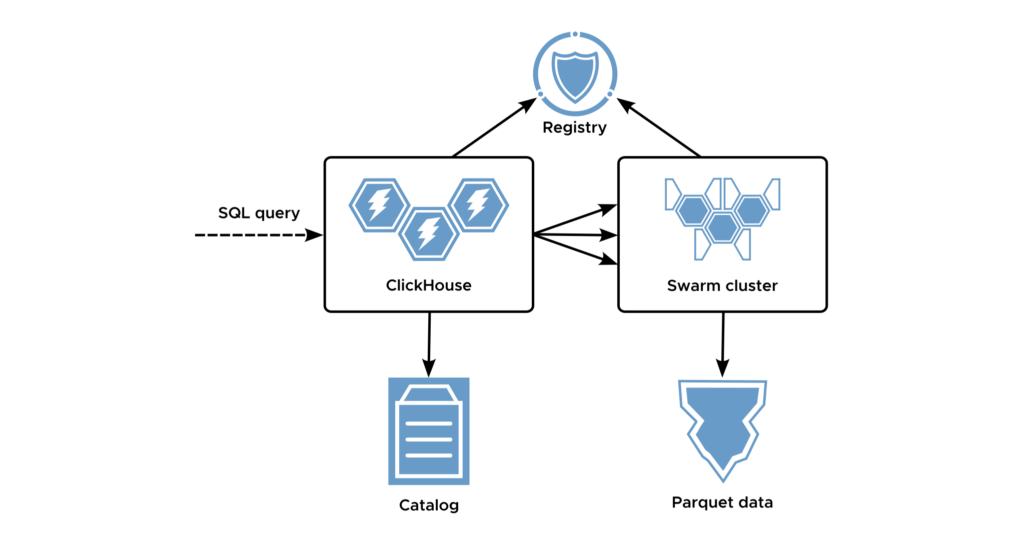
In order to connect a swarm to the primary ClickHouse clusters, [auto-discovery via a separate Keeper instance is used](https://docs.altinity.com/altinityantalya/antalya-concepts/#swarm-auto-discovery-using-keeper). This architecture is natively supported in Altinity.Cloud.
## What Are Standalone Swarms?
Standalone swarms are an architecture where a swarm cluster is not directly connected to the main ClickHouse cluster. This may be useful on multiple occasions. In particular, it allows us to deploy swarms in a different network, e.g. in order to make it closer to the data and reduce network transfers.
The deployment that we discussed earlier requires a special Gateway ClickHouse.
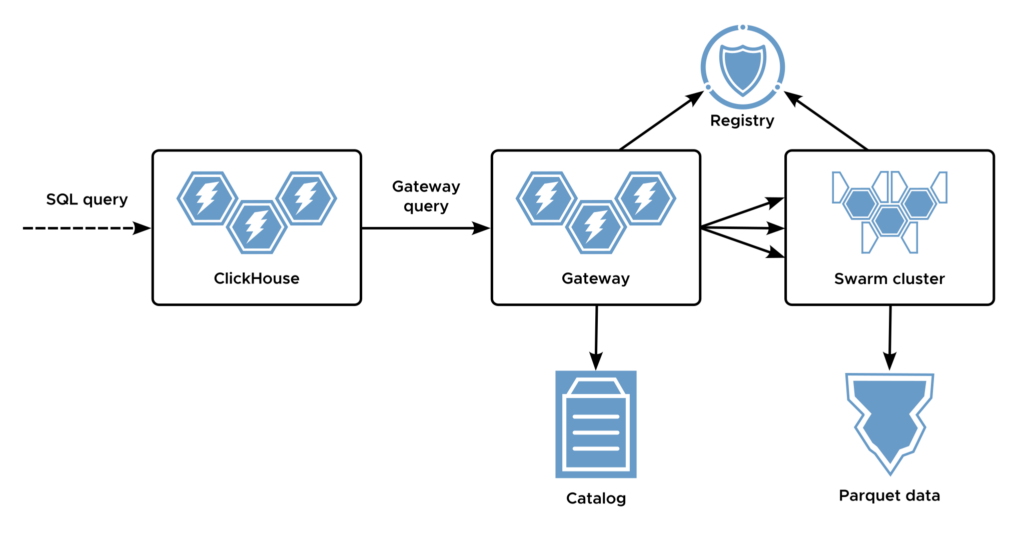
When a user runs a query on ClickHouse cluster, he or she uses the ‘`cluster`’ table function that resolves the gateway in order to offload the Iceberg part of the query to the swarm. This approach works, but has some limitations.
First, it requires some [schema modifications on the Initiator cluster](https://altinity.com/blog/data-lake-query-acceleration-using-standalone-antalya-swarms#h-set-up-proxy-table-definitions). Users cannot extend compute applied to existing Iceberg tables directly with the ‘`object_storage_cluster`’ function, and have to wrap calls in the ‘`cluster`’ table function or a Hybrid table engine. It would be more natural to keep using Iceberg engine tables directly.
The bigger problem is the Gateway server, though. The Gateway is needed for one important reason: it knows all about swarm nodes that are located in the same network. The Initiator only needs one address and that’s it. However, the Gateway becomes a single point of failure. It needs clustering for high availability; that increases cost and operational complexity.
This leads to a question. What if we get rid of the Gateway server and use swarm clusters directly through the load balancer? That would be a nice simplification. It turns out we have all the pieces in place to do it!
## Remote Standalone Swarm
Instead of using a gateway, let’s connect the initiator to the swarm cluster directly. All swarm nodes know each other already. So once an Iceberg query lands on a random swarm node, this swarm node should act as an initiator and distribute the work to other nodes. No gateway and discovery is needed!

It is simple, isn’t it? Let’s wire everything up and test how it works.
Let’s say there are two ClickHouse clusters: the User cluster or Initiator cluster, and the Swarm cluster.
In our example, we will be using the `my-swarm.altinity-antalya.altinity.cloud` swarm. The DNS name is a swarm cluster entry point, with 3 swarm nodes behind the load balancer.
Also, for an apples-to-apples comparison, we will use an initiator that is already connected to the swarm with auto-discovery. That will allow us to compare the overhead of using a standalone swarm versus a direct swarm connection.
First, let’s make sure that all queries reaching swarm nodes are run in swarm mode automatically. In order to do that, let’s create a user ‘`swarm_user`’, assign it to a profile ‘`swarm_profile`’ and set `object_storage_cluster=my-swarm` in profile settings.
Next, we need to configure swarm access on the initiator by adding a single node cluster reference:
```
my-swarm.altinity-antalya.altinity.cloud
9440
swarm_user
[HIDDEN]
1
```
So, now if we use the ‘`altinity-antalya-swarm`’ cluster it should route queries to the swarm.
There is one caveat, though. When the initiator is connected to the swarm directly using registry auto discovery, it may offload S3 queries directly to the swarm using vended credentials. With a remote standalone swarm the initiator cannot do this, since it does not know destination cluster nodes, only an entry point. Therefore we need to connect the swarm to the Iceberg catalog explicitly, and make sure that both initiator and swarm use the same database name for it. By “connect” we mean we’ll need to issue a `CREATE DATABASE` command using the DataLakeCatalog engine. In our example the name is ‘`ice`’.
```
CREATE DATABASE ice ON CLUSTER 'my-swarm'
ENGINE = DataLakeCatalog('http://ice-rest-catalog:5000')
SETTINGS auth_header = '[HIDDEN]', warehouse = 's3://altialya-2fv4arm7-iceberg', catalog_type = 'rest'
```
We can do a few sanity checks to confirm the connection works:
```
select hostName(), count() from cluster('altinity-antalya-swarm', system.one) group by 1
select hostName(), count() from cluster('altinity-antalya-swarm', ice, 'aws-public-blockchain.btc')
```
In both cases, ClickHouse will think ‘`altinity-antalya-swarm`‘ is a single node. This is expected since we defined it as a single node on Initiator. How can we make sure the query is executed in a distributed mode then?
The trick is a combination of two Antalya settings – `object_storage_remote_initiator` and `object_storage_remote_initiator_cluster`:
```
SETTINGSobject_storage_remote_initiator=1, object_storage_remote_initiator_cluster='altinity-antalya-swarm'
```
When used, they do the following magic under the hood:
- Rewrite the query as
```
SELECT * FROM remote(, iceberg(...))
```
- Use `object_storage_cluster` in the Iceberg query as defined on the remote initiator user profile.
## Trying It Out
In order to test how it works, we will use a very simple query over 4 months of public blockchain dataset data preloaded to the Iceberg catalog:
```
SELECT date(block_timestamp), count() FROM ice."aws-public-blockchain.btc"
GROUP BY 1
```
The single node query takes about 1.3s – fast enough.
Now let’s run it in swarm mode, using a 3-node swarm connected by auto-discovery:
```
SELECT date(block_timestamp), count() from ice."aws-public-blockchain.btc"
GROUP BY 1
SETTINGS
object_storage_cluster='my-swarm', log_comment='direct-swarm'
```
It runs 0.8s on the first run, and 0.4s on the second and following runs after the catalog and caches warm up. This is already real time.
Finally, let’s run a remote swarm query:
```
SELECT date(block_timestamp), count() from ice."aws-public-blockchain.btc"
GROUP BY 1
SETTINGS
object_storage_remote_initiator=1, object_storage_remote_initiator_cluster='altinity-antalya-swarm',
log_comment='remote-swarm'
```
It runs in 0.4-0.5s on remote swarms as well!
## Debugging Swarm Query Performance
The remote swarm did not perform as fast as the direct one until [Antalya Build 26.3.13.10001](https://docs.altinity.com/releasenotes/altinity-antalya-release-notes/26.3/#v2631320001). It took us a while to understand that the problem was in skipping the aggregation step. Debugging swarm query performance is not trivial, because the query is executed at multiple servers, and it took us a while to capture the root cause.
In order to make it simpler to understand and compare query metrics, we have developed the following approach with a special helper view:
```
CREATE DATABASE IF NOT EXISTS altinity_system;
CREATE OR REPLACE VIEW altinity_system.query_log AS
SELECT
'local' AS source_scope,
* REPLACE(splitByChar('.', hostname)[1] AS hostname)
FROM system.query_log
UNION ALL
SELECT
'cluster' AS source_scope,
* REPLACE(splitByChar('.', hostname)[1] AS hostname)
FROM clusterAllReplicas({cluster:String}, system.query_log)
```
The `altinity_system.query_log` is a parameterized view. It merges local and remote query logs together. We only need to provide a cluster name as a parameter:
```
WITH arrayJoin(
mapFilter((k, v) -> (k LIKE 'S3%' or k LIKE 'Ice%' or k LIKE 'Parquet%'),
sumMap(ProfileEvents))
) AS s3_events
SELECT s3_events.keys,
source_scope,
log_comment,
s3_events.values, max(query_duration_ms)
FROM altinity_system.query_log(cluster='my-swarm')
WHERE type = 'QueryFinish' and event_date = today() and log_comment in ('remote-swarm', 'direct-swarm')
group by all order by all
```
Now we can drill down to various metrics and debug performance problems if needed.
## Final Words
[Antalya’s swarm execution model](https://docs.altinity.com/altinityantalya/) allows efficient compute scaling for Iceberg data. Standalone swarms reduce operational overhead since they do not require complex configuration changes to the original ClickHouse cluster. Moreover, it allows the deployment of swarms in different networks. Even further, ClickHouse cluster and Antalya swarm clusters can be deployed at different datacenters or regions, allowing us to place swarms close to the Iceberg data and therefore reduce network latency and cost.
It paves a bridge for ClickHouse to become a universal query engine for data lakes without sacrificing native ClickHouse features. Resources for ClickHouse data and Iceberg queries can be managed independently, allowing flexible deployment scenarios. We only used swarms for queries so far, but we plan to expand it to ingest and data compaction workloads as well. We still keep discovering new applications and advantages of swarms by ourselves. Join us in this interesting adventure!